Covers new capabilities in Report Assistant. Review previous versions for past releases. The reading physician is solely responsible for the final report and must carefully review all automated content.
What is Report Assistant?
Report Assistant is an advanced AI tool designed to support reading physicians in preparing, refining, and managing medical imaging reports. It enhances workflow efficiency and ensures high-quality report content while preserving physician oversight.
Core Purpose:To assist, not replace, the reading physician in: | |
|---|---|
Previous Release - Release 3.0 | Generating specific sections of the report such as Impression and Recommendations. |
Previous Release - Release 3.1 | In addition to the previously available features, this release introduces two major enhancements: Report Correction and Prompt Insertion. |
Previous Release - Release 3.2 | In addition to the previously available features, this release introduces Clinical Guidance for Breast Reporting. |
Current Release - Release 3.3 | In addition to the previously available features, this release introduces personalized reporting tailored to each reading physician’s individual preferences, supporting clear, professional, and accurate report generation. |
Report Assistant 3.3 Sub-Agents | |
|---|---|
Release 3.0 | |
Report Impression 1.0 | |
Report Recommendation 1.0 | |
Release 3.1 | |
Report Impression 1.1 | |
Report Recommendation 1.1 | |
Report Corrector 1.0 | |
Prompt Insertion 1.0 | |
Release 3.2 | |
Report Impression 1.1 | |
Report Recommendation 1.1 | |
Report Corrector 1.0 | |
Prompt Insertion 1.0 | |
Breast Reporting 1.0 | |
Release 3.3 | |
Report Preference 1.0 | |
Breast Reporting 1.1 |
User Guide for New Capabilities
Breast Reporting 1.1 | |
|---|---|
Customized recommendations are now allowed for Breast Reporting 1.1. Users can set these custom recommendations using Report Preference 1.0. | |
Reports now include "Assessment," "Recommendations," and "Warning" sections for supported breast exams. | |
The system has been updated to better recognize complex or unusual cases, especially highly suspicious lesions, making report generation more accurate and reliable. |
Report Preference 1.0 | |
|---|---|
Report Preference 1.0 is a configurable sub-agent within the Report Assistant that allows reading physicians to personalize how their radiology reports are generated and formatted. These preferences enable specific report creation and can be configured at the reading physician, facility, or facility group level. If preferences are not set, the default settings will apply. | |
Reports now include "Assessment," "Recommendations," and "Warning" sections for supported breast exams. | |
Key Configurable Options: | |
Report Corrector Toggle: Enable or disable the Report Corrector sub-agent to automatically identify and correct errors within reports. | |
Formatting Style for Report Impressions and Recommendations: Choose the preferred format for generated text—bulleted lists, numbered lists, or new-line separated entries. | |
Breast Reporting Recommendations: Customize the recommendations displayed for eligible breast imaging reports to align with institutional or personal reporting preferences. | |
Generation Settings for Impressions and Recommendations: Adjust how the content is generated by controlling the level of detail included and defining what constitutes a recommendation. | |
Correction Scope: Specify which elements to correct, such as common dictation errors or stylistic inconsistencies encountered during report creation. |
Flexible Settings: Configure 5 Preference Types Via Macro ID | |
|---|---|
 |
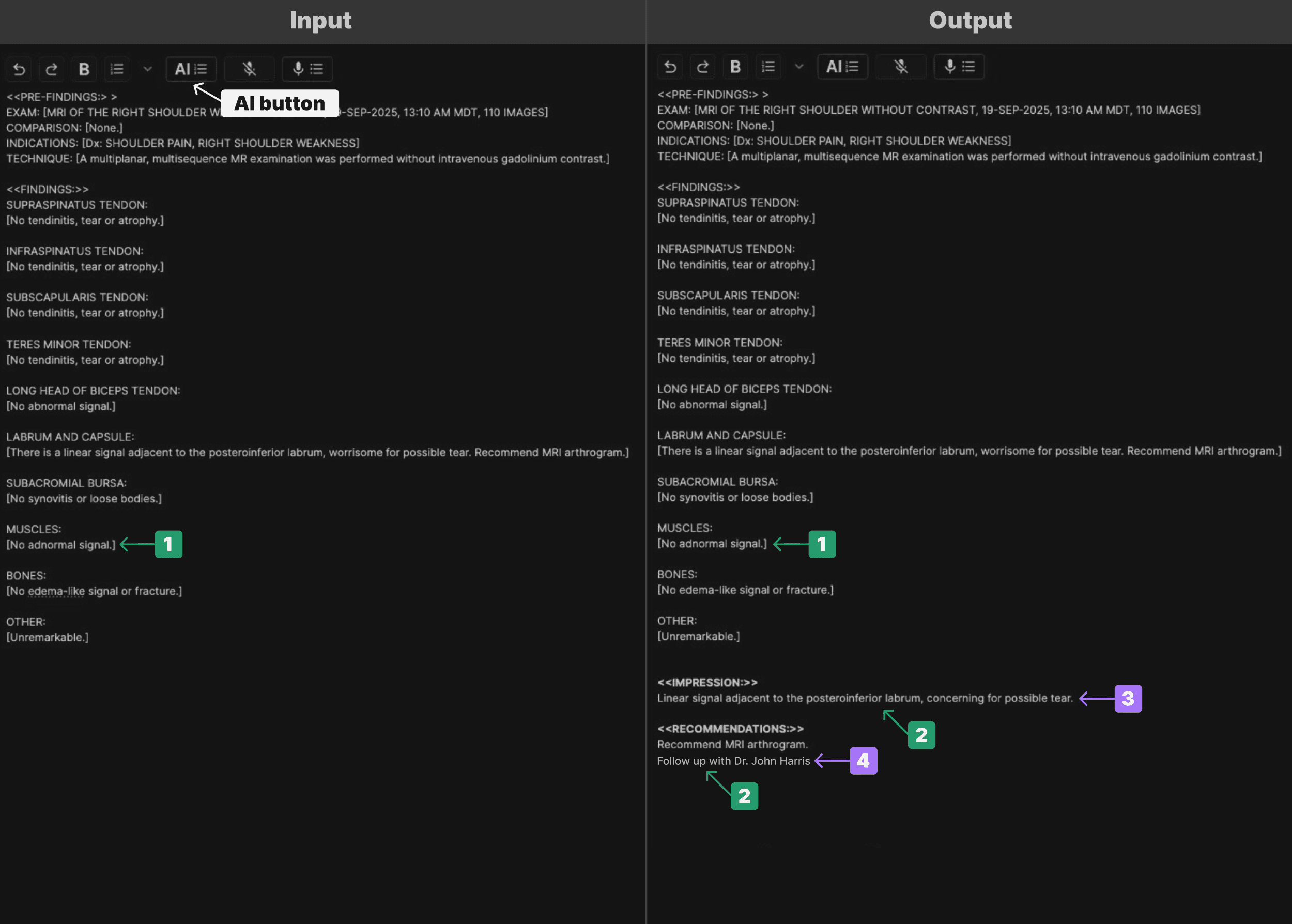
Scenario 1: Reading physician with ID = 188935 presses AI Button | |
|---|---|
The default preference for that reading physician is automatically applied. According to the preferences defined in the table, the reading physician prefers: | |
| |
| |
| |
| |
 |
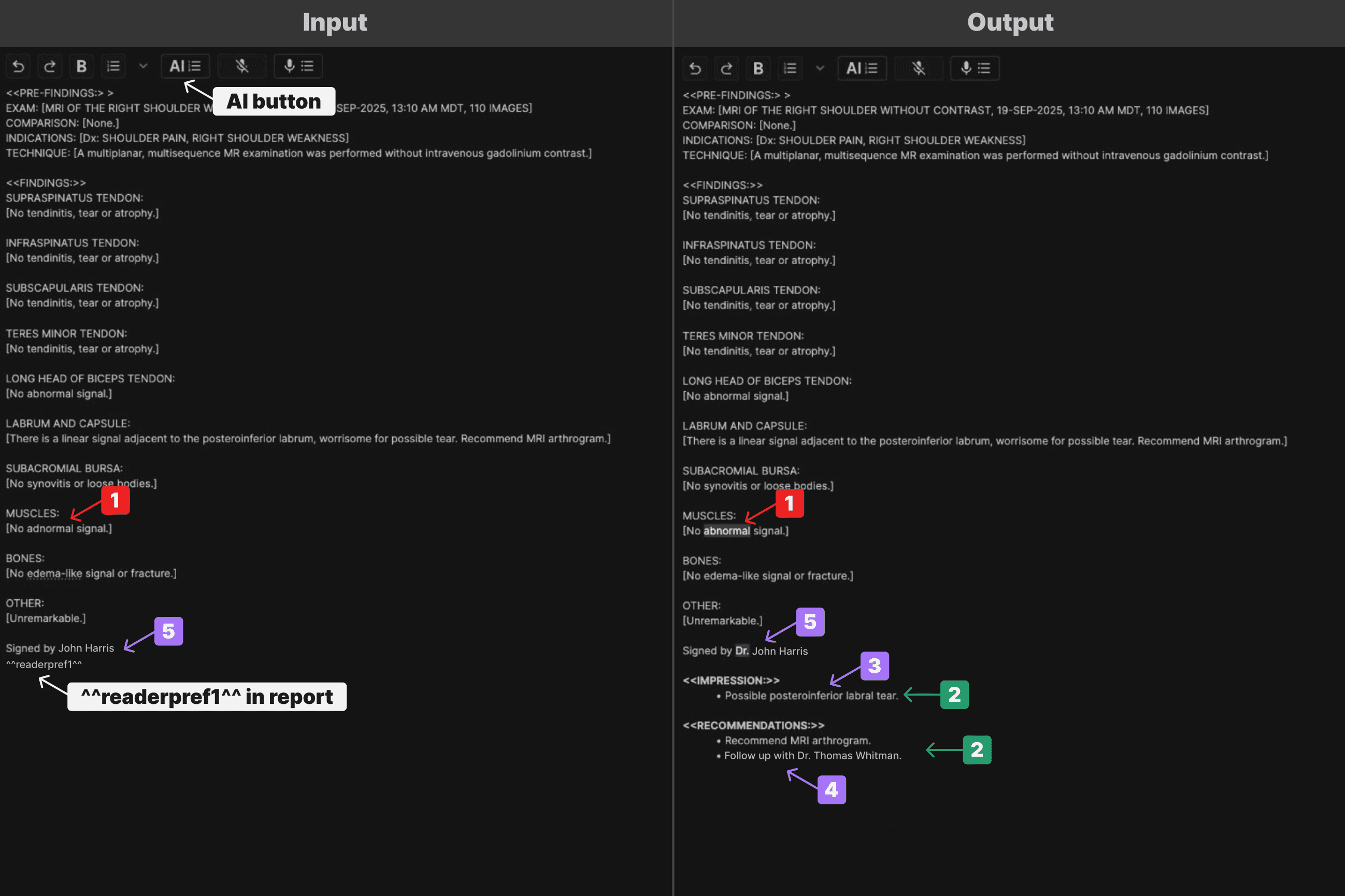
Scenario 2: Reading physician with ID = 188935 and puts ^^readerpref1^^ in report and then presses AI Button | |
|---|---|
The preference associated with Macro ID 1 for that reading physician has been applied. According to the preferences defined in the table, the reading physician prefers: | |
| |
| |
| |
| |
| |
 |
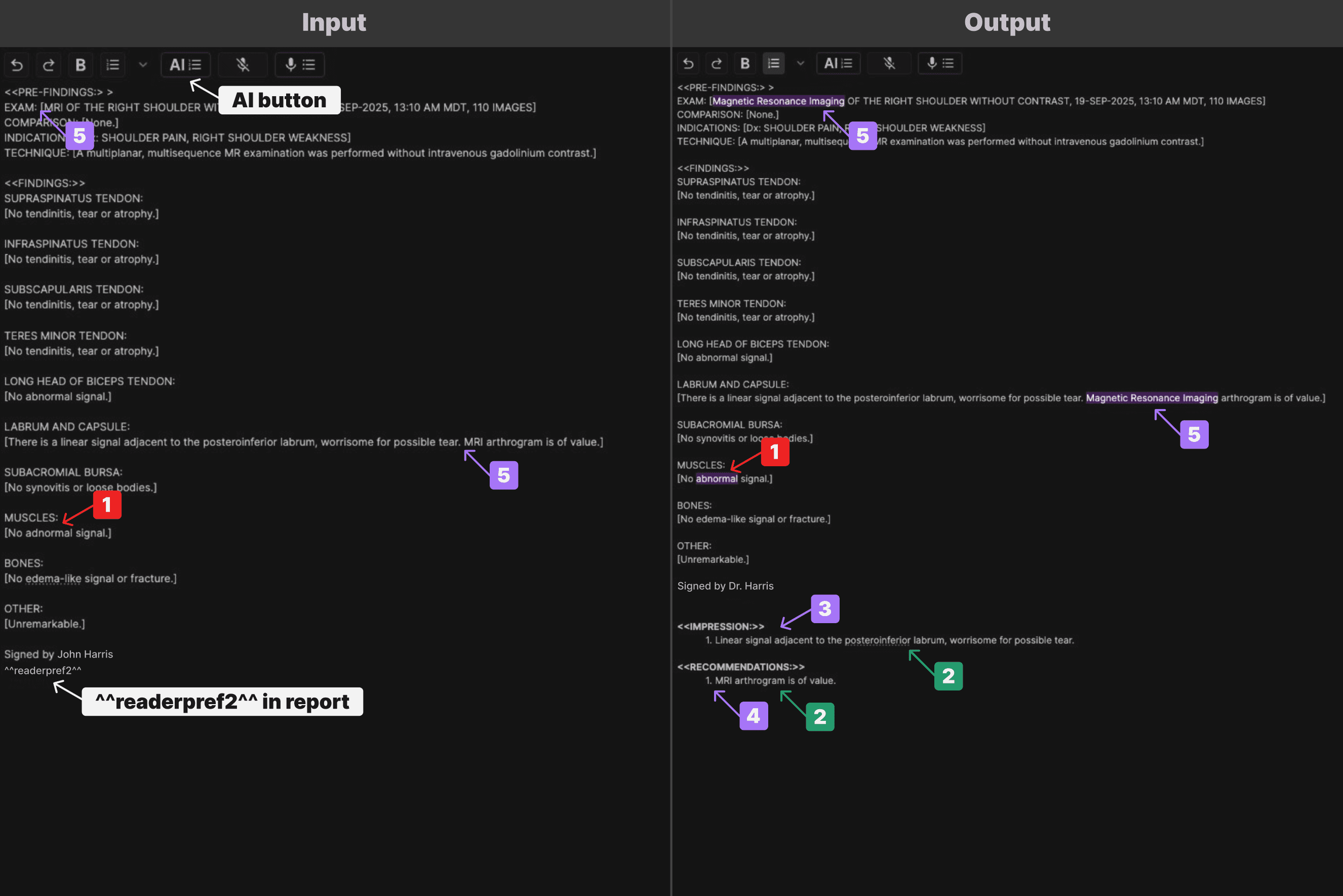
Scenario 3: Reading physician with ID = 188935 and puts ^^readerpref2^^ in report and then presses AI Button | |
|---|---|
The preference associated with Macro ID 2 for that reading physician has been applied. According to the preferences defined in the table, the reading physician prefers: | |
| |
| |
| |
| |
| |
 |
Guide to Features and Use
Key Features & Benefits | |
|---|---|
Correction Toggle and guide: | |
Turn automatic corrections (spelling, terminology, etc.) on or off, depending on your preference. Always correct ‘plural effusion’ to ‘pleural effusion’. | |
Personalized Reports: | |
| |
| |
| |
|
Correction Toggle and guide: | |
|---|---|
Use macros to change your default settings. ^^readerprefID^^ | |
Preferences can be configured at three levels: reading physician, facility, or facility group. If no specific preference is selected, a default configuration is applied. | |
Each configuration may include up to five preference sets, identified by Macro IDs 0–4, where Macro ID == 0 represents the default. | |
By default, the preference with Macro ID 0 will be applied. To use any other preference, insert ^^readerprefID^^ (where ID is 1–4) anywhere in the report. This will trigger the corresponding preference behavior during report generation.
|
How Does It Work? | |
|---|---|
Input Required | |
The reporting system will send the report and metadata, including:
| |
Set Up | |
Instead of configuring preferences directly in the system, a template will be provided for completion to set up the preferences. | |
Use | |
When you create a report, Report Assistant uses your preferences to format and generate content. | |
Output | |
A JSON-formatted preference is generated using the highest-priority ID available. This preference is sent to the Report Assistant along with the report and metadata, ensuring the correct logic is applied automatically. | |
Override | |
For special cases, you can use macros or instructions to change settings just for one report. | |
Disable | |
Using Report Preferences, the support team can disable Report Assistant at the reading physician, facility, or facility group level by setting the Report Assistant Version to 0.0 within the Report Preferences for that level. When Report Assistant is disabled, clicking the [AI] button will not trigger Report Assistant or make any modifications to the existing report. |
Other Important Information | |
|---|---|
Limits | |
There is up to total of five different custom preferences for reading physician level | |
Performance | |
Changes to preferences happen quickly, with no downtime. | |
Security & Privacy | |
Only authorized users can view or change preferences. All changes are tracked for accountability. | |
Feedback | |
Your feedback helps us improve! We track how often preferences are used and measure satisfaction. |